- Excavation100%Reached 22 Aug · verified by site engineer
- Foundation100%Reached 11 Sep · 3 photographs attached
- Structure35%in progress
- Finishing0%not started
Press to mark the slab done — watch the demand’s due date on the right.
A portal lead lands, goes to a telecaller and then to a sales executive after the first call. The same record carries the site visit, the cost sheet, the booking, each payment demand and the handover — so nobody rebuilds the buyer’s story from WhatsApp and Excel.
Skip the story — see how it worksThe telecaller, the sales executive, the CRM team and accounts all work on the same buyer record, from the first enquiry to the keys. Deliberately nothing behind the site gate — no procurement, BOQ or accounting.
99acres, MagicBricks, Housing.com, IndiaMART, JustDial and Facebook or Instagram lead forms land next to the website form and the AI chatbot. A buyer who enquires on three portals is matched by phone and stays one lead. Walk-ins, referrals and broker leads are entered by hand and counted the same way.
A new telecaller can add a lead, book a visit or build a quote by following a tour on the screen itself. No training week, no manual to read.
Free 1-week trial on request — no card, no commitment.
Built for
Residential developers, builders, in-house property sales teams and the channel partners who sell for them — from a five-person sales desk to a multi-project sales organisation. The MD reads the numbers, telecallers and sales executives work the leads, the CRM team runs collections and handover, and brokers see their own leads and payouts.
See the product →Where a generic CRM stops
the slab decides the due date
Marking the slab complete dates the linked demand — no hand-typed letter on a guessed date.
The statement of account shows paid, due and balance per booking.
Commission accrues when the broker’s lead books, is approved by a manager, and is released only in step with what the buyer has paid. The broker sees the same figure you do.
Works with your portals, WhatsApp, SMS, payments and calendar
01The journey ZevroCRM covers
The telecaller, the sales executive, the CRM team and accounts all work on the same buyer record, from the first enquiry to the keys. Deliberately nothing behind the site gate — no procurement, BOQ or accounting.
Portal, ad, website and chatbot leads land on their own; one lead per phone number.
A new lead goes to a telecaller the moment it arrives — by your rules for project, budget or source, and round-robin when no rule matches. After the first call it moves to a sales executive, and a returning buyer goes back to their earlier executive. On Growth and up, an automation can nudge the owner or reassign a lead left untouched.
Click-to-call logs the call on the lead; WhatsApp, notes and tasks sit beside it. An overdue follow-up alerts its owner, and a lead with no active owner alerts the sales leads.
Book the visit with the sales executive and the site engineer for that project. The executive is reminded 30 minutes before and the engineer 2½ hours before; the buyer 24 hours and 2 hours before, from your own WhatsApp number.
The cost sheet replaces the Excel file: area, rate, car park, corpus and GST, totalled live. It goes out as a branded PDF; a revised quote supersedes the old one, never overwrites it.
The unit is held, then booked, so two executives cannot sell the same flat. Payment milestones are seeded from the project’s plan, and the buyer gets a portal where they can pay a milestone through a payment link.
Each stage carries its date and photographs and dates the linked payment demand — see below.
A relationship manager takes over the buyer; the handover is a record, not a phone call.
Buyers raise tickets from the portal — a leak, a document, a wrong receipt. Tickets are routed to staff by rule, with the whole history on record.
02The workspace
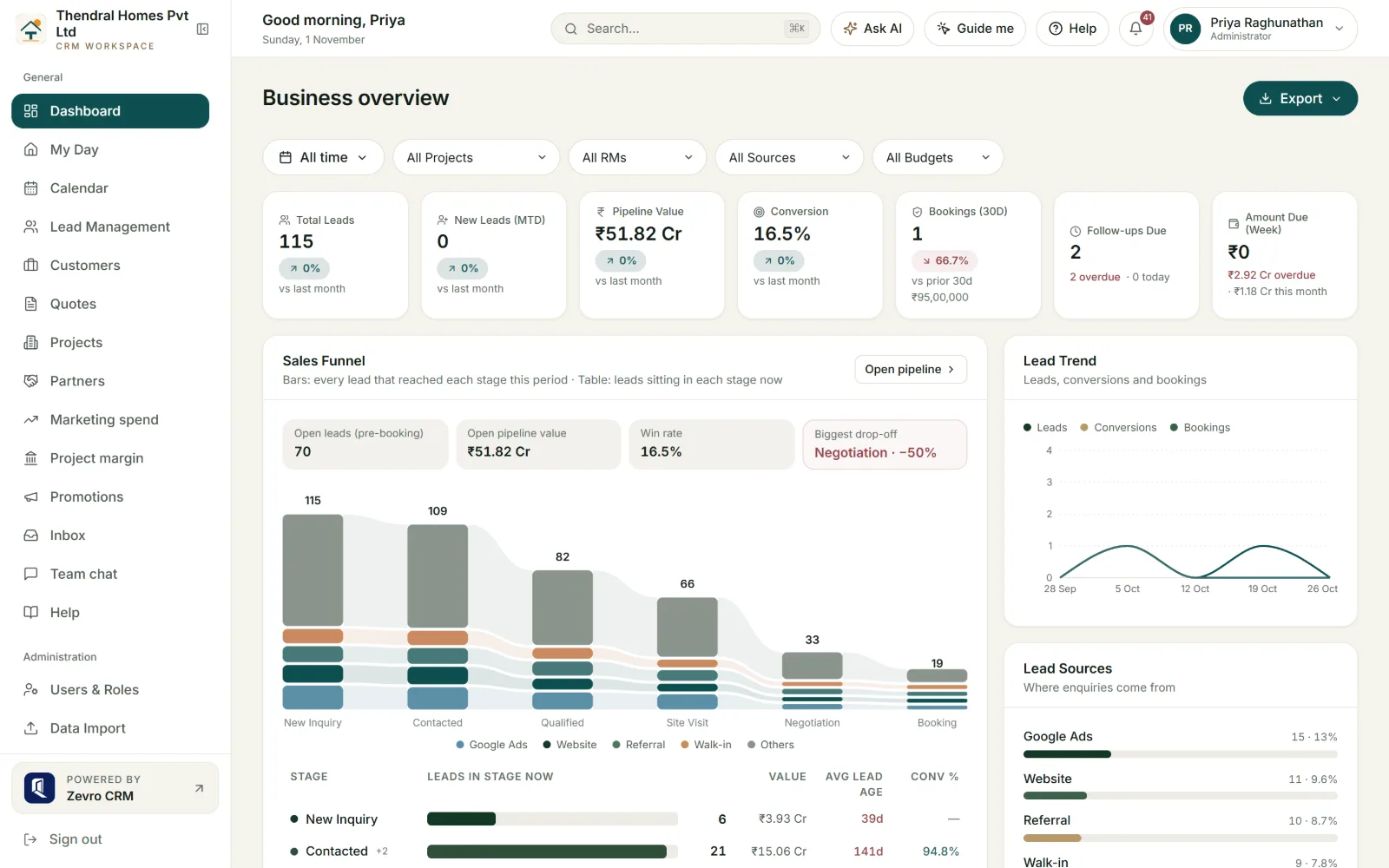
The owner and the sales head open this first: enquiries, site visits, bookings and booked value for the dates picked, the daily trend, and which sources the enquiries came from. Nobody has to prepare a report for the Monday review, and nobody has to phone accounts to ask what came in.
Beside the sales tiles sit the instalments due this week and this month, what is overdue, and the follow-ups due today. The follow-ups tile opens each one, with its lead and owner.
On Growth and Enterprise the owner gets one message at 8 AM on the days chosen, by WhatsApp or email: yesterday’s new leads, bookings and collections, overdue follow-ups, today’s site visits and what falls due this week.
Pick a relationship manager and the dashboard shows their book instead of sales figures: their bookings, money collected on them, handovers still pending and open support tickets.
03AI that does the legwork
A 10 pm portal enquiry usually waits till morning — by then the buyer has called two other builders. ZevroCRM’s AI replies, scores the lead and answers the MD’s questions. Buyer details are masked before any AI call.
Greets every new portal, ad and website lead on WhatsApp within a minute, answers questions from your live inventory, books the site visit and hands over to your team for negotiation or anything it is unsure of. If nobody on your team replies after the handover, the lead owner is alerted. The whole chat sits on the lead record. Set up with our team.
The MD can ask “which source gave us bookings last quarter?” and get an answer in plain words, without waiting for an MIS report from the sales head. Every answer is checked against the figures it quotes before you see it.
Each lead gets a score from 0 to 100 with a written reason and a suggested next step. A telecaller with a long list calls the serious buyers first, and your routing rules can send high-scoring leads to a chosen set of executives.
Names, phone numbers, emails, PAN, Aadhaar and bank details are replaced with placeholders before any AI call, and restored only inside your workspace. AI stays off until your data-protection record names a provider.
04Construction-linked collections
In a construction-linked plan the buyer pays when the slab is cast, not on a date someone guessed in Excel. ZevroCRM dates the demand when the site reaches the stage, with the photographs attached. The CRM team stops chasing the site for proof, and the buyer can see what they are paying for.
Press to mark the slab done — watch the demand’s due date on the right.
Sample booking. Click the button to see the demand re-date itself.
Each booking carries construction stages from your template — excavation, foundation, structure, finishing. Each stage records % complete, the date the site actually reached it, and photographs. The buyer sees the same timeline in their portal.
Marking a stage complete moves the linked demand’s due date to “date reached + grace days”. The demand goes out against evidence, not a hand-typed letter on a guessed date.
A partial or paid milestone keeps the date the buyer was given, so a late site update never rewrites what was already collected. If a workspace renames a payment row, the link goes quiet rather than wrong.
05After the booking
In most builder offices the CRM ends at the booking. Collections then move to Excel, hand-typed demand letters and WhatsApp reminders. ZevroCRM keeps the payment plan, demands, receipts, GST and TDS, the statement of account and the handover on the same buyer record.
| Agreement value | ₹1.45 Cr |
|---|---|
| Paid to date | ₹58.0 L |
| GST collected | ₹2.90 L |
| TDS on property | ₹58,000 |
| Balance | ₹87.0 L |
Illustrative data from a test workspace.
Set a payment plan for the company, a project, or one property type in a project. Quotes print that schedule and bookings are seeded from it. 3 days and 1 day before a due date, the RM and the sales executive are reminded, and the buyer sees it in the portal and by push.
Sent to the buyer, and to their home-loan bank once the buyer’s consent is recorded. Late-payment interest is off unless a project switches it on.
Each project can carry its own bank account, as RERA requires, so its quotes, demand letters and portal show that account. A buyer in one project is not shown another project’s account. Every change alerts the Admins and is audited.
Every payment gets a numbered receipt, restarting each financial year. GST and the buyer’s TDS are recorded as actually paid, so ₹14.85 L received against a ₹15 L demand with 1% TDS is not shown as a shortfall. The statement of account shows paid, due and balance per booking.
Buyers sign in to see dues, bank and UPI details, receipts, documents and the same construction timeline your staff see, and raise a ticket when something is wrong. The answer to “what is my balance?” is on their phone, not in a call to your office.
The relationship manager gets their own screen: their buyers, milestones due, documents still to collect and the handover checklist. Handover is blocked while money is outstanding, unless an Admin overrides it with a written reason.
06Ready on day one
A telecaller who joins mid-launch should be calling leads that week. Guided tours, a “how do I…?” guide and help beside every screen teach them inside the app.
Eleven step-by-step tours cover the jobs people do every day — add a lead, book a site visit, build a quote, record a payment. Click “Guide me” and the tour points to each button in turn.
Type or say “how do I hold a unit?” and the AI guide answers in plain words, pointing at each button you need. It is on every plan and does not use your workspace’s AI allowance.
Each screen and Settings section opens its own guide in a side panel, with search and a way back, so nobody leaves the page they are working on. The guides say what a feature does, what you need, and what you do versus what we do.
AI Lead Desk chats and customer support requests sit in one Inbox, filtered by status, with the person responsible named on every thread. A sales head sees what is open without asking around.
A buyer’s name typed in Tamil prints correctly on quotes, receipts, statements and demand letters, with your logo, GSTIN and RERA number on the page. The screens themselves are in English.
Export leads, lost leads with the reason each was lost, customers and inventory to Excel or CSV whenever you need them — for a review meeting or an auditor. A full export of the workspace is done by our team on request.
07Pricing
Priced per workspace, not per seat. Each plan includes staff logins — 10, 30 or unlimited. Adding a telecaller inside your band costs nothing extra, and buyers and channel partners never use a staff login. Tell us about your team and projects and we reply with a quote within one business day.
The full CRM from enquiry to handover, for one sales desk.
Adds AI, automation, the unit grid, channel partners, calling and online payments.
Everything in Growth, plus the master plan, your own brand end to end, and larger limits.
08Questions we hear often
Straight answers on what ZevroCRM does, who it is for, and how your data is handled.
ZevroCRM is a real estate CRM for builders, developers and property sales teams in India. It keeps every property enquiry, site visit, follow-up and negotiation — from enquiry to booking, payments and handover, on one buyer record — so a sales manager can see which deals are moving and which have gone quiet without asking anyone for a status update.
ZevroCRM is built for residential developers, builders, in-house property sales teams and the channel partners who sell for them. It suits teams running one project or several, from a five-person sales desk to a multi-project sales organisation.
A generic CRM stops at “deal won”. ZevroCRM continues through what happens next in property sales: unit inventory with holds, the cost sheet and branded quote, the booking, payment milestones with numbered receipts and GST/TDS, construction stages that date the payment demands, a customer portal, channel-partner commissions released as money is collected, and the handover. A generic CRM has to be bent into that shape with custom fields.
ZevroCRM is priced flat per workspace, not per user, and quoted on enquiry. It comes in three plans, Starter, Growth and Enterprise, compared in full on the pricing page. Tell us your team size and projects using the form there and we reply with a quote within one business day. You can also ask for the free 1-week trial first and use a workspace yourselves.
Each booking carries a payment schedule seeded from your workspace template. Every payment gets a numbered receipt with GST and TDS recorded, and the statement of account shows paid, due and balance. Construction stages — with % complete, the date reached and photographs — set the due date of the linked demand as “date reached plus grace days”, so a demand is raised against evidence rather than a spreadsheet date. Money already paid is never re-dated.
Yes, as early access. ZevroCRM’s AI Lead Desk greets each new portal, ad and website lead on WhatsApp within a minute, answers questions about the project, books the site visit and hands the conversation to your team when a person is needed. It quotes prices only as they stand in your inventory and passes any negotiation or discount to your team. It runs on your workspace’s own WhatsApp number and is set up by arrangement with our team.
Inside the app. ZevroCRM has eleven guided tours — adding a lead, booking a site visit, making a quote, recording a payment and more — and an AI guide that answers “how do I…?” by pointing at each step on the screen, typed or by voice. Every screen also opens its own help guide in a side panel.
Book a demo and we run a 30-minute walkthrough set up with your own projects, with guidance on moving off spreadsheets — or ask for the free 1-week trial and use a workspace yourselves. Write to hello@zevrocrm.com or use the form on this page; we reply within one business day.
Yes. ZevroCRM offers a free 1-week trial on request: we set up a workspace under your company name, filled with a year of sample projects, leads and bookings, and your team uses it for a week. No card is taken. It is a sandbox — nothing is sent outside the CRM, integrations are view-only, it is for sample data only, and it is deleted after the trial. There is no free plan.
See the product screen by screen · Still unsure whether it fits how you sell? Book a demo or write to hello@zevrocrm.com.
Tell us a little about your team and projects. We’ll show you exactly how ZevroCRM fits your sales workflow — from first enquiry to handover.